
ROBO Keycaps Rock Your Desk Like the 80s
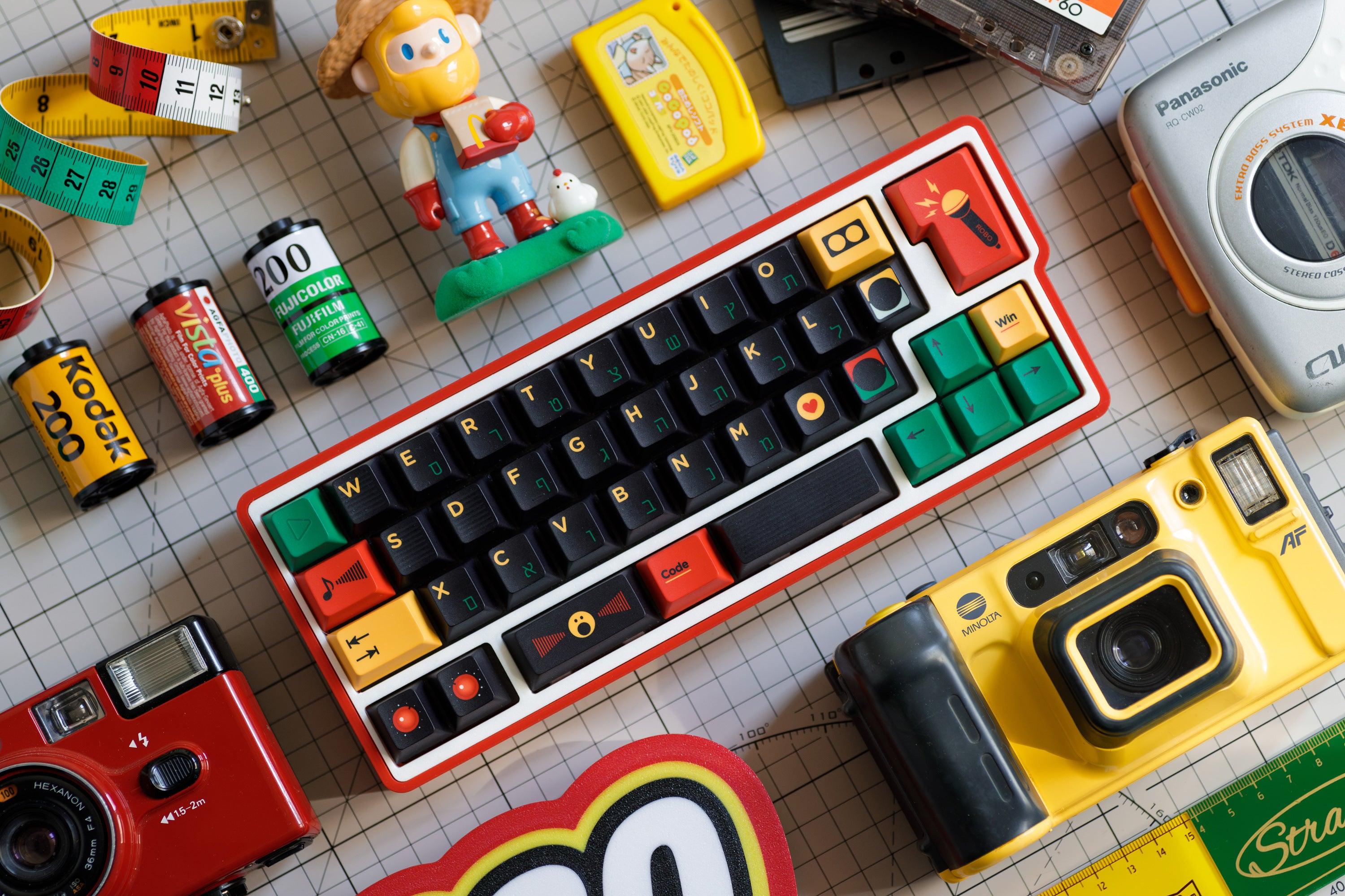
Imagine your desk full of bright colors and excitement, reminiscent of the 1980s. The ROBO Keycaps bring the bold style of a retro cassette player, transforming your keyboard into something fun to look at. The rounded shapes and vibrant colors make you want to showcase your desk to friends. Over the last ten years, enthusiasts have enjoyed using retro keycaps and other old-school items to personalize their spaces. These elements help you express your identity and make your environment feel cool and creative. Picture your own desk with some ROBO magic added for that perfect touch of nostalgia.
Key Takeaways
-
ROBO Keycaps add bright 80s style to your keyboard. They make your desk look fun and full of color.
-
These keycaps are made from strong PBT material. They do not fade or get shiny, so they stay looking new for a long time.
-
The round shape and fun colors of ROBO Keycaps make typing better. They can also make you feel happier.
-
ROBO Keycaps work with most mechanical keyboards. They fit many layouts, so putting them on is simple and easy.
-
You can change how your keyboard looks by switching keycaps. This lets you be creative in many different ways.
-
Use ROBO Keycaps with cool things like neon mousepads or old-school gadgets. This helps your desk look neat and matching.
-
ROBO Keycaps feel nice to touch and sound good when you type. This makes typing comfy and enjoyable.
-
You can join the ROBO Keycaps group to show off your desk. You can also see other people’s cool setups and get new ideas.
What Are ROBO Keycaps?

You might wonder what makes ROBO Keycaps stand out from the crowd. These keycaps come from WUkds and take inspiration straight from the classic cassette players of the 1980s. When you look at them, you see a playful design that brings back memories of old-school music and bright colors. ROBO Keycaps turn your keyboard into a retro masterpiece that feels both fun and fresh.
Key Features
Material & Build
ROBO Keycaps use PBT, a tough and textured material. PBT feels solid under your fingers and does not get shiny or yellow over time. You get a keycap set that stays looking new, even after months of typing or gaming. The makers use thermal sublimation to lock in the colors, so the bright accents never fade. Each keycap has a thickness of 1.7mm, which gives you a sturdy and premium feel every time you press a key.
Tip: PBT keycaps last longer than ABS ones. You will notice the difference in texture and durability right away.
Here’s a quick look at how ROBO Keycaps compare to other sets:
|
Feature |
Description |
|---|---|
|
Design Inspiration |
Vintage cassette player |
|
Shape |
Cute, rounded |
|
Material |
PBT |
|
Process |
Thermal sublimation |
|
Number of Keys |
145 |
|
Profile Height |
Cherry |
|
Color Scheme |
Predominantly black with accents of yellow, green, and red |
|
Keycap Thickness |
1.7mm |
Color & Shape
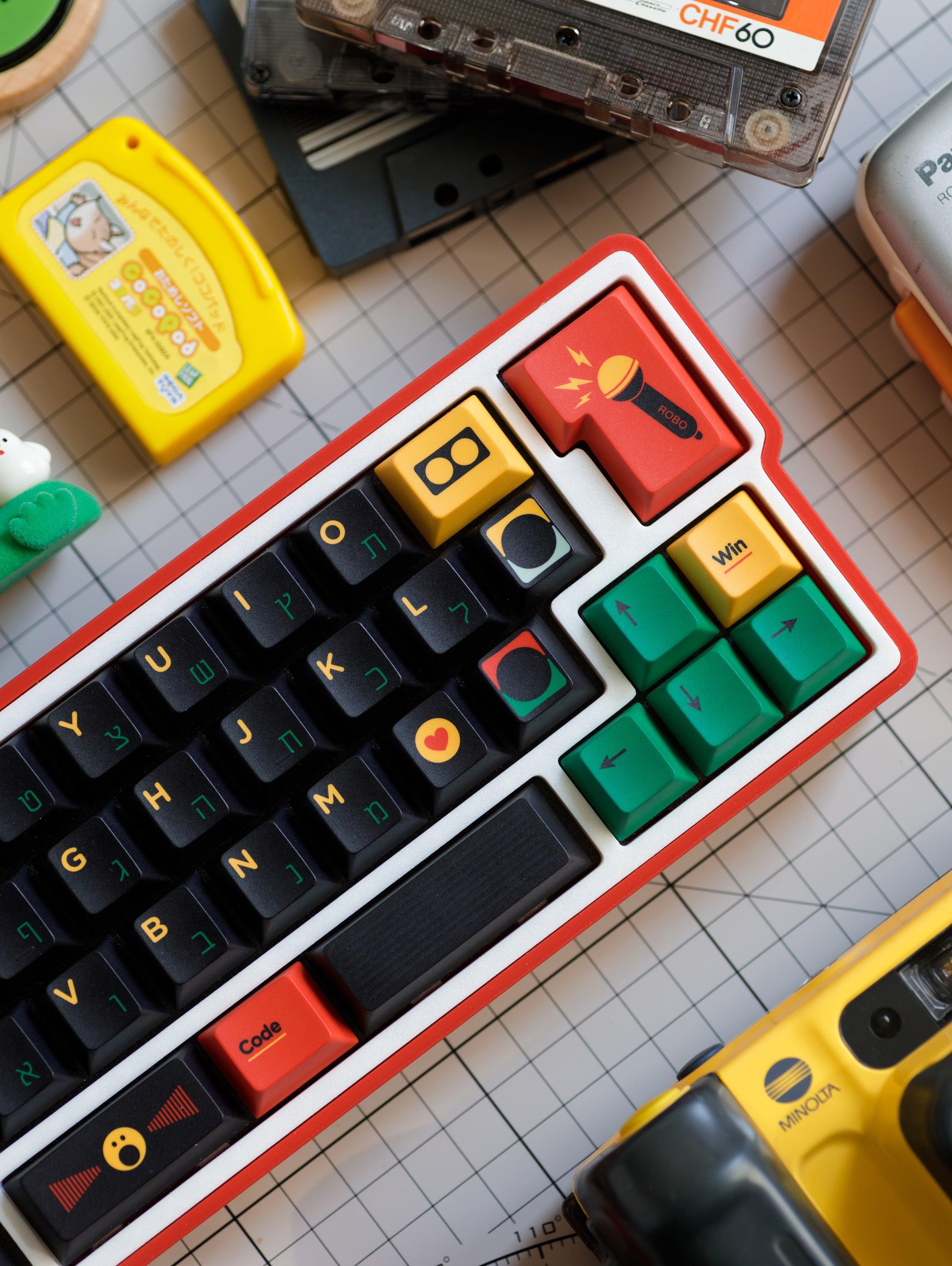
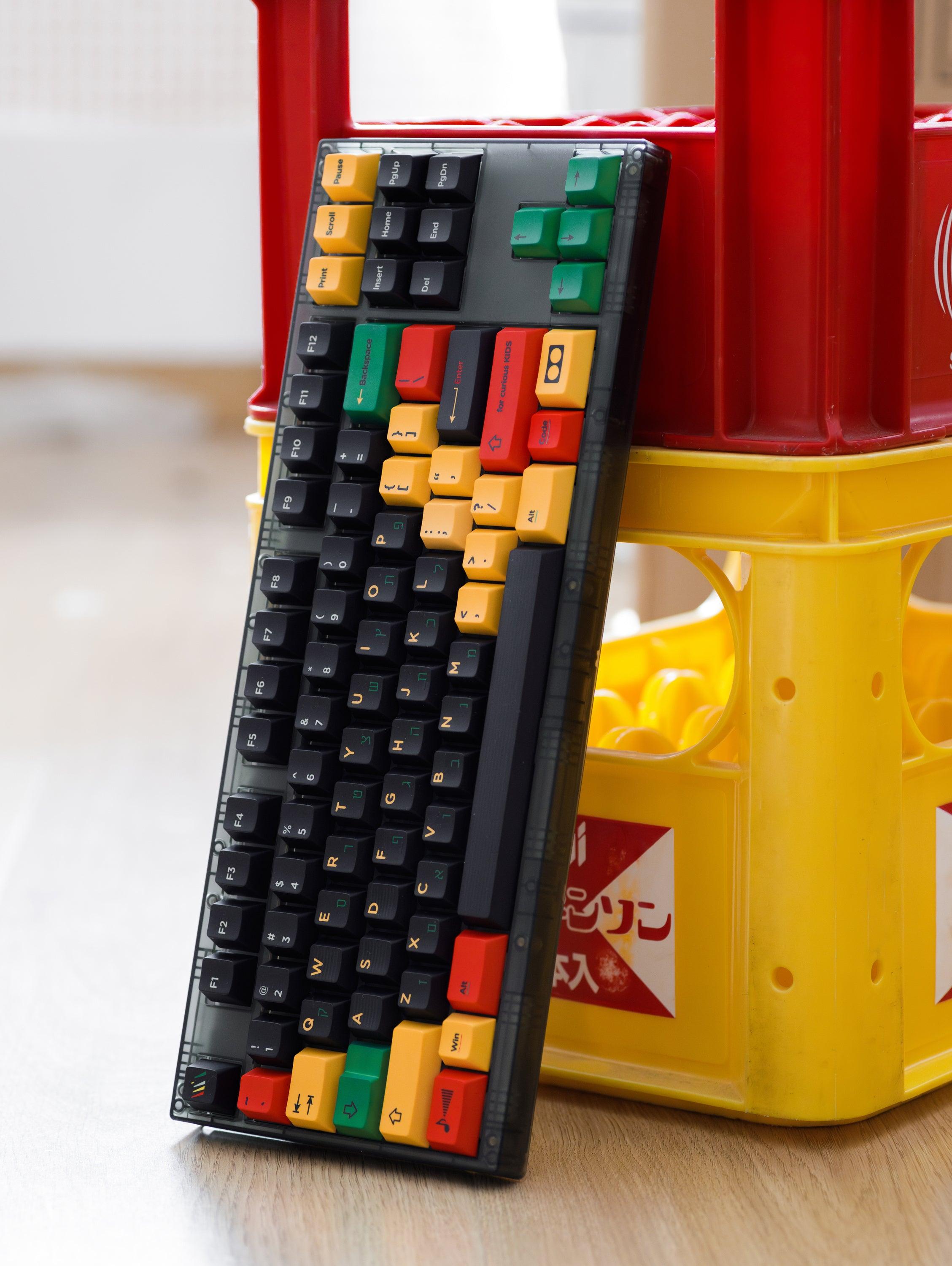
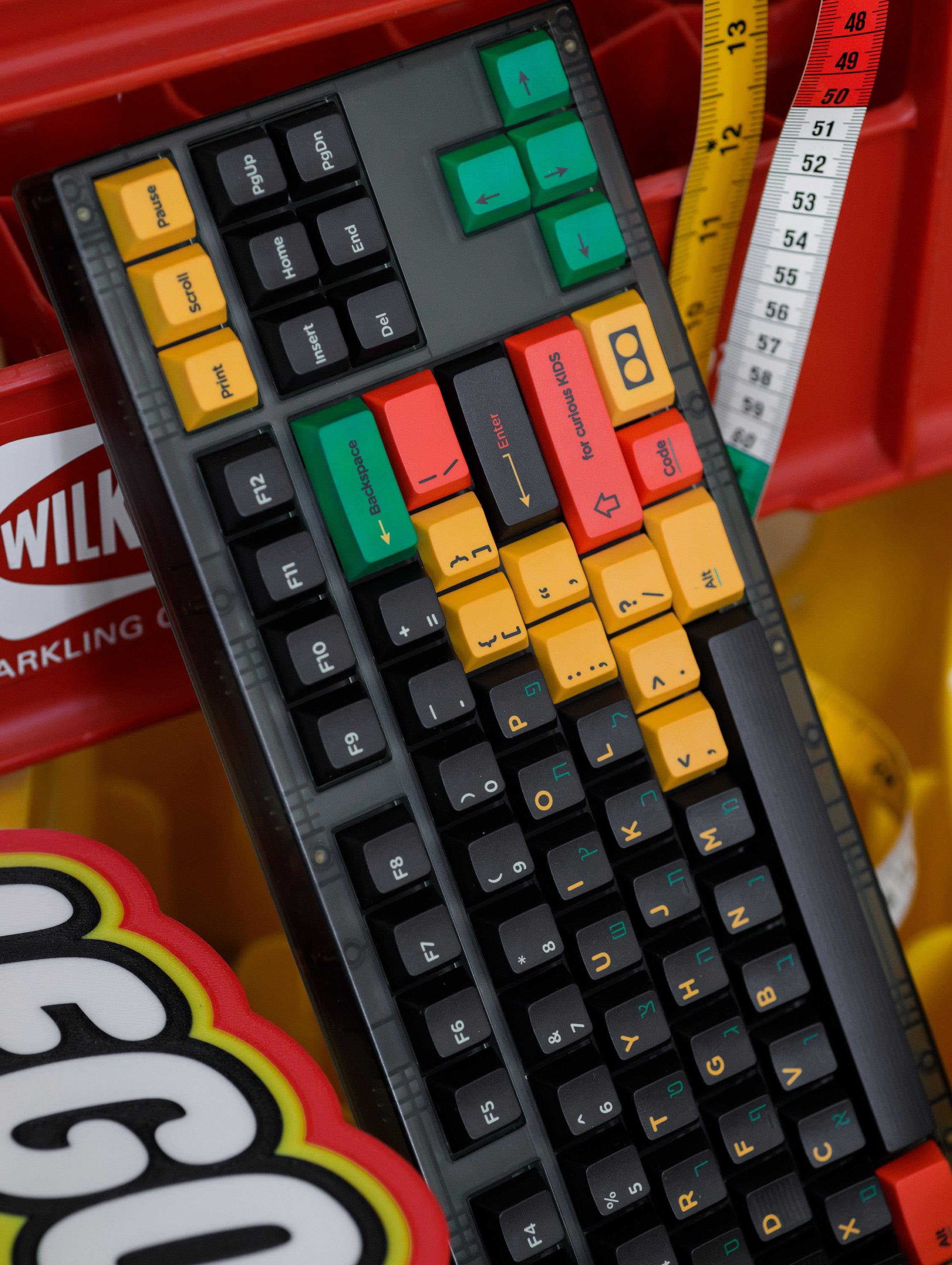
ROBO Keycaps pop with color. You get a sleek black base with splashes of yellow, green, and red. The rounded shapes make each key look friendly and unique. This design brings a cheerful vibe to your desk and makes your keyboard stand out. If you love retro styles, you will enjoy the playful look every time you sit down to type.
Compatibility
Keyboard Layouts
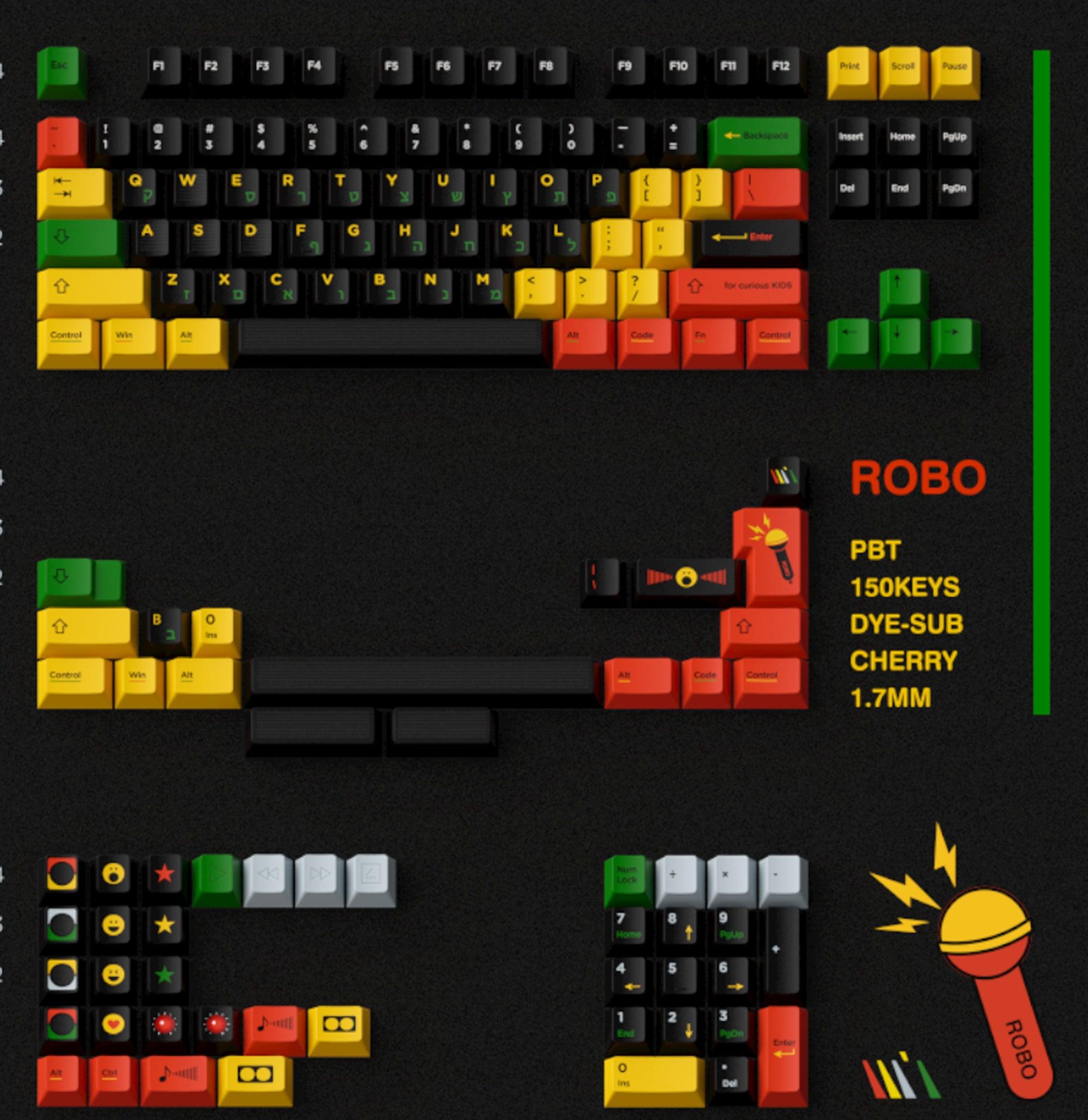
You do not have to worry about fitting these keycaps on your keyboard. ROBO Keycaps come with 145 keys, so you can use them on many different layouts. Whether you have a full-size board or something smaller, you will find the right keys for your setup.
CHERRY Profile
ROBO Keycaps use the CHERRY profile, which means they fit most mechanical keyboards. The CHERRY profile feels comfortable and familiar, making your typing smooth and easy. You can swap out your old keycaps and install ROBO Keycaps without any hassle.
Note: If you want a quick upgrade, ROBO Keycaps work with most popular mechanical keyboards. You do not need special tools or skills.
ROBO Keycaps blend retro style with modern quality. You get a set that looks cool, feels great, and fits almost any keyboard. If you want to add personality to your desk, these keycaps make it easy.
80s Aesthetic Influence
Design Elements
Colors & Patterns
Step into the world of the 1980s. You see colors that shout for attention. Neon yellow, electric green, and bold red fill the room. Patterns jump out at you. Stripes, grids, and blocks create a sense of movement. You feel energy everywhere. The 80s loved to mix colors that did not match. You get a wild look that makes you smile.
ROBO Keycaps bring this feeling to your desk. The black base sets the stage. Bright accents pop on each key. You notice the playful mix of colors every time you type. The patterns remind you of cassette tapes and arcade games. You get a desk that feels alive.
Tip: Try arranging your keys in different color patterns. You can create your own retro vibe.
Shapes & Vibes
The 80s did not like boring shapes. Designers used circles, squares, and rounded edges. You see these shapes in old toys, music players, and posters. Everything looks soft and friendly. You feel like you are in a cartoon.
ROBO Keycaps use rounded shapes to make each key look unique. The curves invite you to touch them. You get a keyboard that feels fun, not serious. The vibe is playful. You want to show off your desk to friends.
-
Rounded keys feel comfortable.
-
Bright colors boost your mood.
-
The design makes your desk stand out.
Retro Elements in ROBO Keycaps
Modern Interpretation
You live in a world that loves new technology. Still, you want a touch of the past. ROBO Keycaps mix old-school style with modern build quality. You get the best of both worlds.
The designers took ideas from cassette players and arcade machines. They added strong PBT material and thermal sublimation. You get colors that last. The keys feel solid and smooth. You do not worry about fading or wear.
ROBO Keycaps fit today’s mechanical keyboards. You enjoy the retro look without giving up comfort. The set works for gaming, work, or just typing a message. You get a desk that feels personal and creative.
Note: Retro style does not mean old technology. You get modern features with classic looks.
ROBO Keycaps help you bring the 80s to your workspace. You get bold colors, fun shapes, and a playful vibe. Your desk becomes a place where creativity shines.
Desk Transformation with ROBO Keycaps
Desk Visual Impact
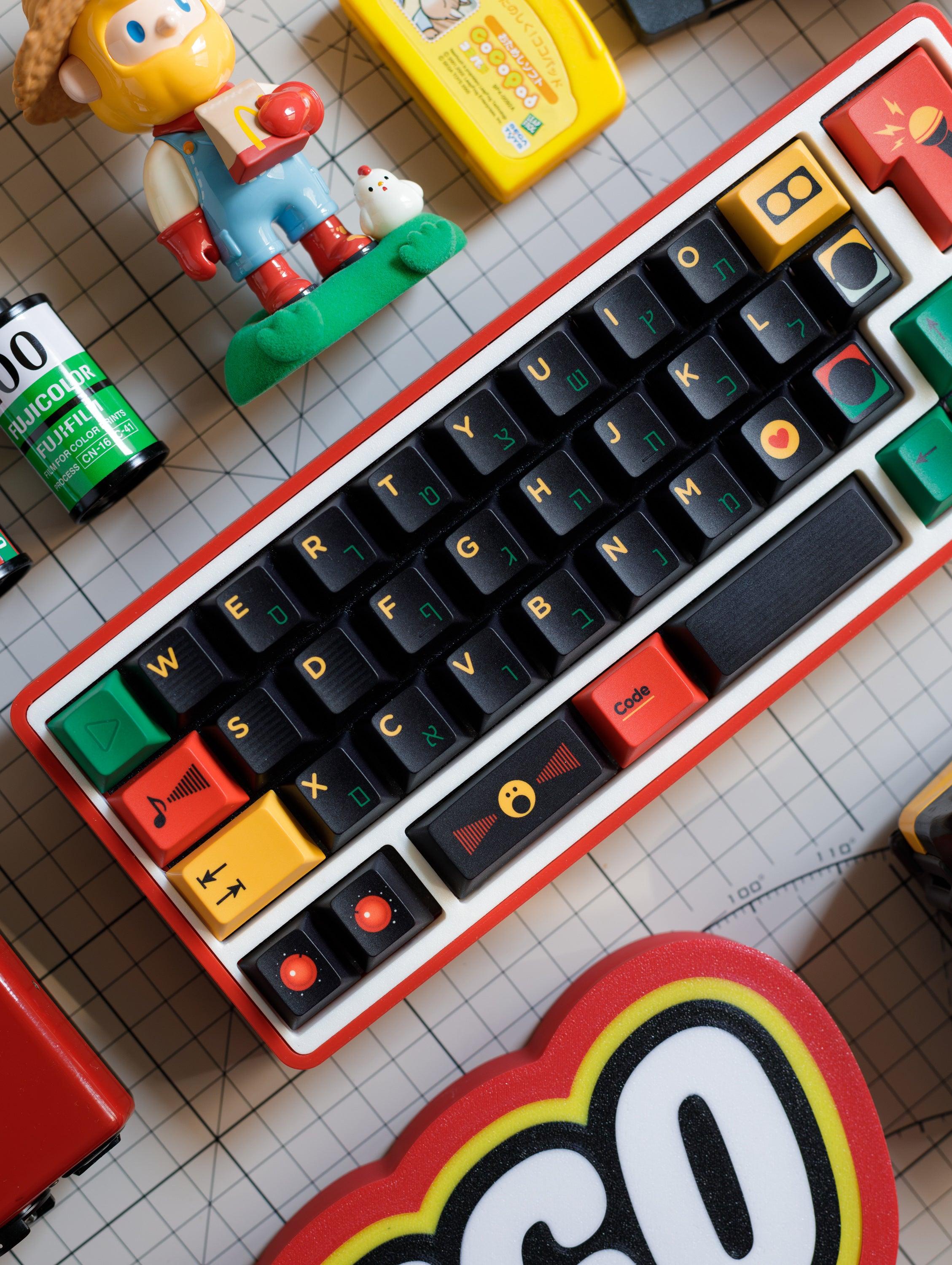
ROBO Keycaps change the way your desk looks and feels. When you swap out your old keycaps, you notice the difference right away. The dark base creates a bold contrast against your desk. Bright colors like yellow, green, and red pop out and grab your attention. Your workspace starts to look more serious and professional, but it still keeps a playful vibe.
You might feel more focused when you sit down to work or play. The clean lines and modern look help you stay organized. Unique designs, like gradients or color blocks, add personality and make your keyboard stand out. Your desk becomes a place where you want to spend time.
Minimalist Setups
If you like a simple desk, ROBO Keycaps fit right in. The black base blends with most minimalist themes. Pops of color give your setup just enough energy without making it look messy. You can keep your desk clean and tidy, but still show off your style.
-
Black keycaps match white or wood desks.
-
Bright accents add a touch of fun.
-
Rounded shapes soften the look.
Try placing your keyboard in the center of your desk. Let the colors draw the eye and create a focal point.
Themed Setups
Do you love a themed desk? ROBO Keycaps help you build a retro scene. Pair them with other 80s-inspired items, like posters or desk toys. You can match the colors of your keycaps with your mousepad or lamp. Your desk turns into a creative space that feels like a blast from the past.
-
Mix and match colors for a custom look.
-
Add cassette tapes or arcade figures.
-
Use neon lights for extra flair.
|
Setup Type |
Visual Effect |
Mood Created |
|---|---|---|
|
Minimalist |
Bold contrast, clean lines |
Focused, modern |
|
Themed |
Playful, colorful, unique |
Creative, nostalgic |
Accessory Pairing
ROBO Keycaps look even better when you pair them with the right accessories. You can build a desk that feels complete and true to the 80s.
Mousepads & Mats
Choose a mousepad with geometric patterns or neon colors. A mat with stripes or grids matches the vibe of your keycaps. You can pick a black mat to keep things simple, or go wild with a bright design.
-
Neon mousepads boost the retro feel.
-
Geometric shapes tie the look together.
-
Large mats protect your desk and add style.
A matching mousepad makes your keyboard pop even more.
Retro Gear
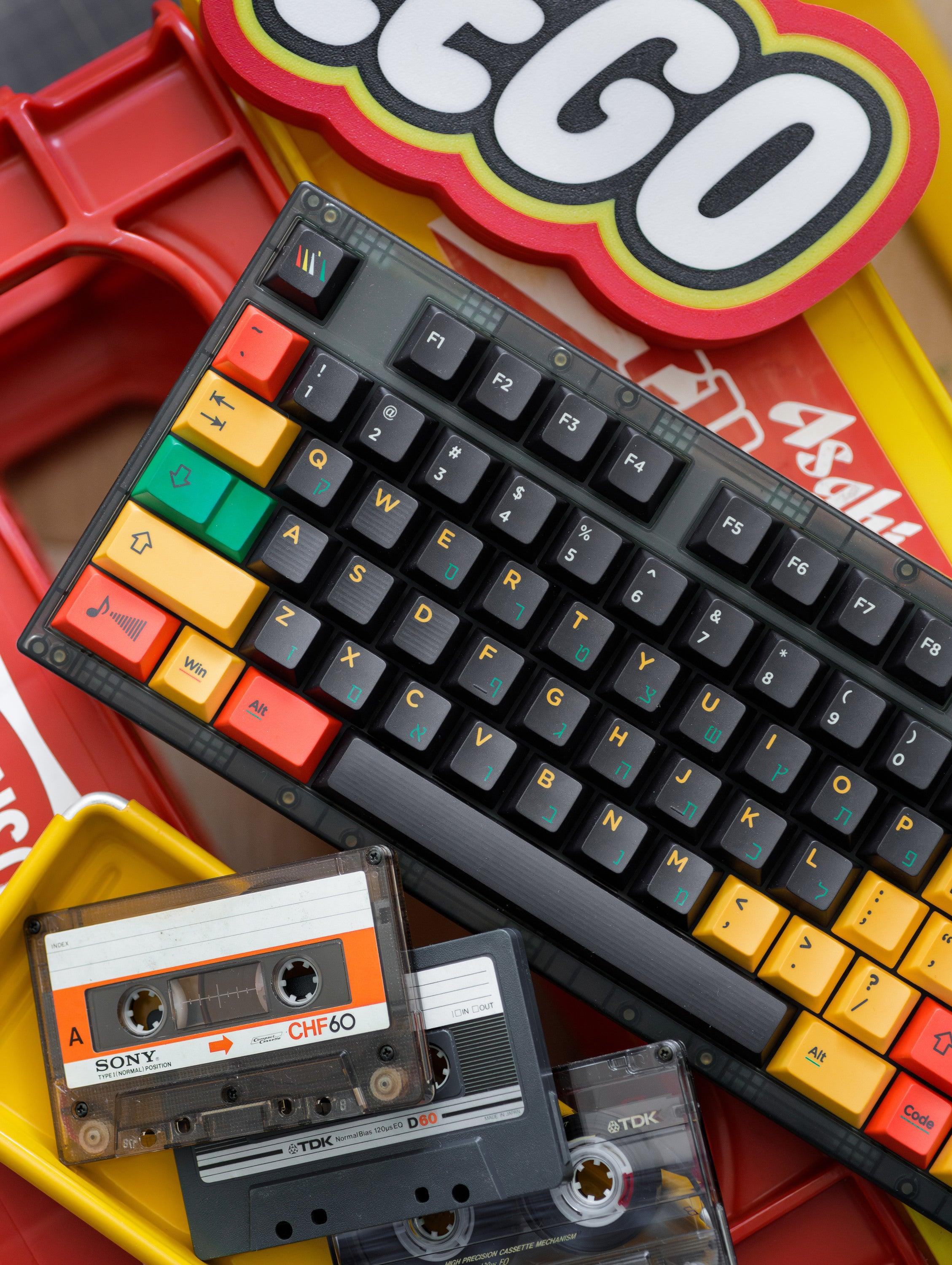
Add some classic gear to your desk for a full transformation. Old-school cassette tapes, mini arcade machines, or vintage speakers fit right in. You can place a Rubik’s Cube or a retro clock next to your keyboard. These items make your workspace fun and unique.
-
Cassette tapes remind you of the 80s.
-
Arcade toys add a playful touch.
-
Vintage gadgets complete the look.
Your desk becomes more than just a place to work. It turns into a creative zone that shows off your personality. ROBO Keycaps help you build a space that feels bold, focused, and full of energy.
Practical Benefits
Typing Experience
Tactile Feel
When you start typing with ROBO Keycaps, you notice the difference right away. The 1.7mm thickness gives each key a solid, premium feel. Your fingers glide over the rounded shapes, making every press comfortable. You do not feel any rough edges or cheap plastic. The keys feel sturdy and smooth, so you can type for hours without discomfort.
Many users say their hands feel less tired after switching to these keycaps. You get a softer touch and a more pleasant experience. If you spend a lot of time at your keyboard, you will appreciate how these keycaps help reduce strain.
Sound Profile
The sound of your keyboard changes with ROBO Keycaps. You hear a gentle, satisfying thock instead of a harsh click. The PBT material absorbs some of the noise, so your typing sounds quieter and more refined. This makes your workspace feel calmer, whether you are working, gaming, or chatting online.
Tip: If you want a quieter desk, PBT keycaps are a great choice. They help keep distractions to a minimum.
Durability & Maintenance
PBT Material
You want your keycaps to last. PBT keycaps with thermal sublimation can stay strong and vivid for 5 to 10 years or more. The colors do not fade, and the matte finish resists shine. ABS keycaps may wear out in months, but PBT keeps looking fresh year after year.
-
PBT keycaps resist shine for over 5 years.
-
Thermal sublimation keeps colors bright and clear.
-
You do not have to worry about yellowing or fading.
Easy Cleaning
Cleaning your keyboard does not have to be a chore. PBT keycaps are easy to wipe down with a damp cloth. Dust and dirt do not stick as much, so your setup stays neat. You can remove the keycaps for a deeper clean if you want. Your desk looks sharp and tidy with very little effort.
Customization
Swapping Keycaps
You can change your keyboard’s look anytime. ROBO Keycaps make swapping easy. You just pull off the old keycaps and snap on the new ones. No special tools needed. You can mix and match colors or create your own patterns. Your desk gets a fresh style whenever you want.
Layout Fit
ROBO Keycaps come with 145 keys, so they fit many keyboard layouts. You do not have to worry about missing keys. Whether you use a full-size board or a compact one, you find the right fit. This makes it simple to upgrade your setup and keep your workspace looking cool.
Here’s what users say about the practical benefits:
|
Benefit |
Description |
|---|---|
|
You feel less discomfort while typing, making work more enjoyable. |
|
|
Reduced Strain |
Your wrists and hands stay relaxed, even during long typing sessions. |
|
Enhanced Typing Efficiency |
You type faster and make fewer mistakes, boosting your productivity. |
|
High User Satisfaction |
Most users do not switch back after trying ergonomic keycaps. |
-
Over half of computer users have felt arm, shoulder, or hand pain at work.
-
Wrist pain can lower typing productivity by about 15%.
-
Repetitive strain injuries cost U.S. workplaces billions each year.
ROBO Keycaps give you comfort, durability, and easy customization. You get a desk that looks great and feels even better.
Getting Started with ROBO Keycaps
Ready to give your desk a retro upgrade? You can start by picking the perfect ROBO Keycaps set and installing it with ease. Let’s walk through the process together.
Choosing Your Set
Colorways
You want your keyboard to match your style. ROBO Keycaps come in a classic colorway inspired by cassette players—think black bases with pops of yellow, green, and red. These colors work well with many desk setups. If you love bold looks, this set will catch your eye every time you sit down.
When choosing a set, you should check your keyboard’s layout. Most keyboards use either ANSI or ISO layouts. ANSI has a wide, rectangular Enter key. ISO has a taller Enter key that spans two rows. ROBO Keycaps include 145 keys, so you can fit them on many layouts, like full-size, TKL, 75%, 65%, and 60%.
Here’s a quick guide to help you match your keyboard:
|
Factor |
Description |
|---|---|
|
Compatibility |
Make sure the set matches your keyboard layout (ANSI or ISO) and key sizes. |
|
Keycap Material |
PBT offers higher quality and durability. |
|
Backlighting |
If your keyboard has lights, check if the keycaps let light through. |
|
Aesthetic Appeal |
Pick colors and themes that fit your style. |
|
Keycap Profiles |
Cherry profile feels comfortable for most users. |
Tip: Check your keyboard’s layout before you buy. This helps you avoid surprises when installing your new keycaps.
Where to Buy
You want authentic ROBO Keycaps for the best quality. You can find them online at trusted stores. For example, the WUkds Original Keycaps——ROBO Keycaps are available for $48.88, down from $58.88. That’s a nice discount! Compare prices with other premium sets, like Dwarf Factory Artisan Keycaps ($44+), One Piece Ace ($50), and Quantum-ixer Spacebar ($99). ROBO Keycaps offer great value for their quality and design.
|
Product Name |
Sale Price |
Regular Price |
Discount |
|---|---|---|---|
|
WUkds Original Keycaps——ROBO Keycaps |
$48.88 |
$58.88 |
Save $14.11 |
Installation Tips
Tools Needed
You don’t need many tools to install your new keycaps. A keycap puller is essential. It helps you remove old keycaps safely. A wire-style keycap puller works best because it won’t scratch your new keycaps. If you want to change switches, a switch puller is handy too.
Step-by-Step
Let’s make installation easy:
-
Unplug your keyboard.
-
Use the keycap puller to gently remove each old keycap.
-
Line up your ROBO Keycaps with the correct spots.
-
Press each keycap onto the switch until it clicks.
-
Plug your keyboard back in and enjoy your new look!
Note: Take your time and double-check the layout as you go. You’ll get a smooth, satisfying result.
Now you’re ready to rock your desk with a fresh, retro vibe. ROBO Keycaps make the upgrade simple and fun!
Community Inspiration
You might wonder how other people use ROBO Keycaps to transform their desks. The community loves sharing creative setups. You can find inspiration from users who take their workspace to the next level. Let’s look at some cool desk makeovers and see how you can join the fun.
Desk Makeovers
ROBO Keycaps fans never settle for boring desks. You see people mixing and matching colors, adding gadgets, and building setups that show off their style. Here are some popular ways users upgrade their space:
-
Customized keyboards and macropads with ROBO Keycaps
-
3D printed keycaps for extra flair
-
LED elements that light up the desk
-
Unique deskmat designs with bold patterns
-
Custom switches and stabilizers for a smoother feel
-
CircuitPython compatible macropads for tech lovers
You can start small or go all out. Some users swap just a few keys for a pop of color. Others build a whole retro scene with matching accessories. You might see a desk with glowing LEDs, a custom mat, and a keyboard that looks like it came from an arcade. The best part? You get to decide how your desk looks.
Tip: Try adding one new item at a time. You can see what fits your style and build your dream setup step by step.
User Showcases
The ROBO Keycaps community loves to share photos and stories. You can find desk tours on social media, forums, and even YouTube. People show off their favorite layouts, color combos, and creative ideas. You might spot a keyboard with 3D printed keys next to a glowing macropad. Some users design their own deskmats to match the keycaps. Others use custom switches for a unique typing feel.
Here’s a quick look at what you might see in user showcases:
|
Feature |
How Users Show It Off |
|---|---|
|
Custom Keyboards |
Photos of colorful layouts |
|
LED Setups |
Videos with glowing effects |
|
Deskmat Designs |
Close-ups of bold patterns |
|
Macropads |
Tutorials for tech setups |
|
Switches & Stabilizers |
Reviews of typing experience |
You can join the community by sharing your own desk makeover. Snap a photo, post your story, and connect with other fans. You might get new ideas or inspire someone else to try ROBO Keycaps. The community welcomes everyone, from beginners to pros.
Note: Your desk tells your story. Every setup is unique, and every photo adds to the ROBO Keycaps movement.
You don’t need fancy gear to get started. Just swap a few keycaps, add a fun mat, or try a new light. You’ll see your desk come alive and feel proud of your creative space.
You can bring the 80s back to your desk with ROBO Keycaps. These keycaps mix retro style with strong, modern materials. Anyone can make a desk look bold and creative. Try them out and show off your own setup!
Ready to join the retro desk movement? Share your transformation and inspire others!
FAQ
What keyboards work with ROBO Keycaps?
You can use ROBO Keycaps on most mechanical keyboards. The set fits full-size, TKL, 75%, 65%, and 60% layouts. The Cherry profile matches many popular boards.
Are ROBO Keycaps easy to install?
Yes! You just need a keycap puller. Remove your old keycaps, line up the new ones, and press them on. You do not need special tools or skills.
Will the colors fade over time?
No worries! The thermal sublimation process keeps colors bright and sharp. You can enjoy the vibrant look for years without fading.
Can I clean ROBO Keycaps?
You can clean them with a damp cloth. Dust and dirt wipe off easily. If you want a deeper clean, remove the keycaps and wash them gently.
Do ROBO Keycaps work with backlit keyboards?
ROBO Keycaps do not let light shine through. You still get a cool retro look, but the legends will not glow with your keyboard lights.
How many keys come in the set?
You get 145 keys in one set. This covers most layouts, so you can customize your keyboard without missing any important keys.
Where can I buy authentic ROBO Keycaps?
You can find ROBO Keycaps at trusted online stores. Look for WUkds Original Keycaps to make sure you get the real deal.

Leave a comment
This site is protected by hCaptcha and the hCaptcha Privacy Policy and Terms of Service apply.